Accounts and plans
You don't need an account to use Kelvo. Every drawing tool works for guests. A free account gives you more boards, more AI requests, and drawing together on shared boards.
Pro, Pro+ and Team are the paid plans: each has everything the one before it has. Prices are without VAT.
Plans
| Guest | Free account | Pro | Pro+ | Team | |
|---|---|---|---|---|---|
| What you need | Nothing | An email and password | €4 a month or €40 a year | €6 a month or €60 a year | €6 per seat a month or €60 a year, from 2 seats |
| Every drawing tool, layers, presenting, offline use | Yes | Yes | Yes | Yes | Yes |
| Backup export (.kelvo) | Yes | Yes | Yes | Yes | Yes |
| PNG / SVG export, Copy as PNG | Not included | Yes | Yes | Yes | Yes |
| PDF import | Not included | 5 pages per board | 50 pages at a time | 50 pages at a time | 50 pages at a time |
| Wireframes: phone, tablet and desktop screens with ready parts | Not included | Yes | Yes | Yes | Yes |
| @kelvo requests (ask in any box or text) | Not included | Not included | Yes | Yes | Yes |
| @kelvo draws whole screens (wireframes) | Not included | Not included | Not included | Yes | Yes |
| Boards on this device | 1 | 3 | Unlimited | Unlimited | Unlimited |
| Pages per board | 1 | 1 | Unlimited | Unlimited | Unlimited |
| Boards in the cloud, on all your devices | Not included | The boards you share (3) | Every board, by itself | Every board, by itself | Every board, by itself |
| Drawing together | Not included | 3 boards, up to 5 people at a time | Every board, up to 20 people at a time | Every board, up to 20 people at a time | Every board, up to 20 people at a time |
| View-only links, invites by email, Reset link | Not included | Not included | Yes | Yes | Yes |
| AI suggestions | 15 a day | 25 a day | 200 a day | 200 a day | 200 a day each |
| Large diagram generations | Not included | 3 a month | 100 a month | 100 a month | 100 a month each |
| Private mode (end-to-end encryption of your board keys) | Not included | Not included | Not included | Yes | Yes |
| Diagrams from your AI coding tools (MCP): making and changing them | Not included | Not included | Not included | Yes | Yes |
| Team workspace: boards shared with the whole team, team boards | Not included | Not included | Not included | Not included | Yes |
| Comments on boards, with @mentions | Not included | Not included | Not included | Not included | Yes |
| Shared team templates | Not included | Not included | Not included | Not included | Yes |
| One bill for several people | Not included | Not included | Not included | Not included | Yes |
- AI suggestions count every request to the AI: ghost suggestions, the suggested label in a new box, Improve, Find missing links, @kelvo requests (Pro), Make diagram and Convert sketch. Completing a label as you type runs on your device and doesn't count. The AI only works on your board: it doesn't answer general questions.
- Large diagram generations count the requests that need the larger model: building whole diagrams with @kelvo, a flow of several screens with @kelvo, long messages, more than 30 selected boxes, and Make diagram on long notes. A table or a single screen made with @kelvo counts as one AI suggestion. Guests can still make these requests: they're answered by the regular AI model and count as AI suggestions.
- Daily limits reset at midnight UTC, and monthly limits on the first of the month (UTC).
- On-device suggestions, label completion and Check diagram are unlimited on every plan.
Your account panel
Click Sign in (or your initial, once signed in) next to the board name.
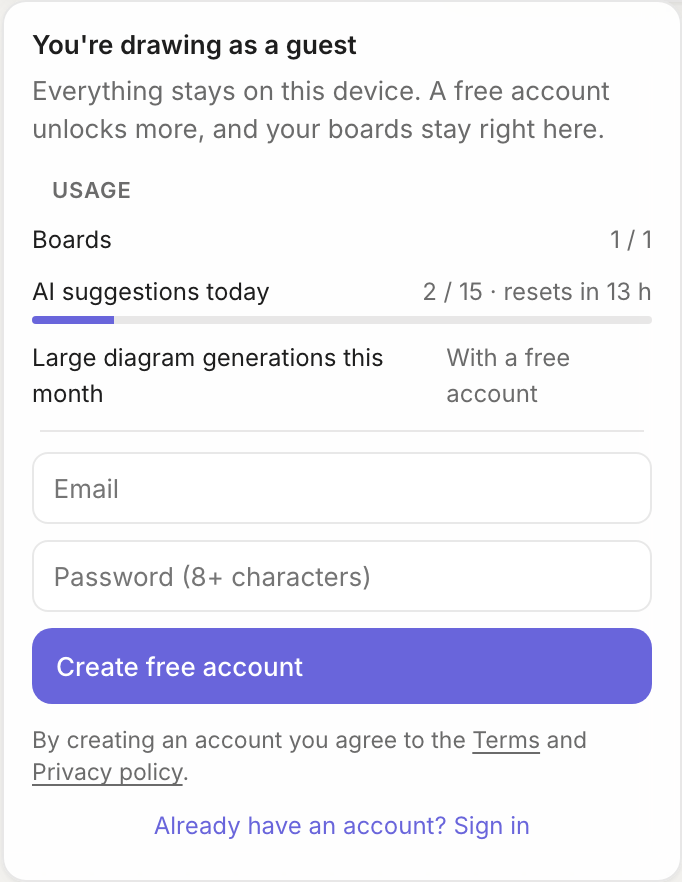
The panel shows:
- how many boards you have, and your plan's limit
- AI suggestions used today and large diagram generations used this month, with when each resets
- Sign out, once you're signed in
Creating an account
- Open the account panel.
- Enter your email and a password of at least 8 characters.
- Click Create free account.
Already have one? Click Already have an account? Sign in.
Your boards stay on this device; creating an account doesn't upload them. The first time anyone signs in on this browser, the boards made as a guest move into that account, so nothing disappears when you sign up. As soon as you sign in, you can have up to 3 boards. AI counts start fresh for your account: guest usage doesn't carry over.
When you reach a limit
A card explains what happened and what you can do:
| Card | What it means |
|---|---|
| Guests can keep 1 board | Create a free account to keep up to 3 boards, or delete your board to start a new one. Your existing boards are never removed |
| Free accounts can keep 3 boards | Delete a board you no longer need to make room. Pro has unlimited boards |
| Sign in to import PDFs | PDF import comes with a free account (5 PDF pages per board) |
| This board already has 5 PDF pages | Delete a PDF page on this board, or use another board. Pro imports up to 50 pages at a time |
| Several pages per board is a Pro feature | On Guest and Free, a board has one page. Boards that already have more pages keep them all |
| Today's AI suggestions are used up | AI pauses until the daily reset. On-device suggestions keep working |
| This month's large diagram generations are used up | Big @kelvo requests and Make diagram on long notes wait until next month. Everything else keeps working |
| Smart Assist is busy on this network | Too many requests came from your connection (for example a shared office network). AI is back shortly |
Not now closes the card. Guests also see Create free account, and free accounts see Upgrade to Pro. Pro+ has every Pro limit, so none of these cards changes with it.
Getting Pro
- Sign in, then open the account panel.
- Under Kelvo Pro, choose monthly (€4) or yearly (€40). Prices are without VAT: where it applies, it is added on the payment page, which shows the total before you pay.
- Pay on the secure Stripe page. Pro is sold through Link, Stripe's checkout service, which sends your receipt.
- You're back on your board, and the badge shows Pro within a few seconds.
Manage subscription in the account panel opens the Stripe page where you can switch between monthly and yearly, change your card, download invoices or cancel. When you cancel, your plan stays on until the end of the period you've paid for, then your account becomes a free account. Your boards stay as they are. See the terms for refunds.
Every change of plan is confirmed by an email from Kelvo that says what changed and what you can do next: when a plan starts, when you move between Pro and Pro+, when you cancel (with the date it stays on until) and when it ends. Receipts, invoices and credit notes come separately, from Stripe.
Pro+ is bought the same way, under Kelvo Pro+ (€6 a month or €60 a year). Already paying for Pro? Open Account & plan (the full window, not the small account panel) and click Switch to Pro+: after you confirm, the subscription changes in place and you pay the difference for the rest of the period straight away. To go back, Switch to Pro… is a small link under the plan there; it asks first, and what's left of Pro+ is credited to your next invoice.
Pro+ and private mode
Pro+ costs €6 a month or €60 a year. It is everything in Pro, plus two things:
- Private mode: your synced boards are locked with a passphrase only you know. The rest of this section is about it.
- Diagrams from your AI coding tools: Claude Code, Codex, Copilot, Cursor and other MCP tools draw diagrams of your code as boards you can edit. See Kelvo in your AI coding tools for how to set each tool up. Reading and opening those diagrams works on every plan; making and changing them needs Pro+ or Team.
Everyone in a team has both as well.
About private mode: Normally the key of each board you sync is kept with your account, so signing in is all a new device needs. With private mode on, those keys are locked with a passphrase only you know before they're stored: no one can open your synced boards without your passphrase or your recovery key.
- Getting Pro+: see Getting Pro above.
- Turning it on: open the boards dialog (All boards… in the board menu) and its Private mode tab, then Turn on private mode… Choose a passphrase (at least 10 characters; a few unrelated words work well), or click Generate one for six random words and a number: write it down and type it again (pasting doesn't work there, so you're sure you have it). Then save the recovery key you're shown: copy it or download it, and keep it away from the devices you draw on. Tick I saved my recovery key and turn it on.
- On a new device: after you sign in, the Private mode tab opens and asks for your passphrase, once per device. Until you enter it, boards synced from your other devices don't appear there, and new boards on that device don't go to the cloud. Not now asks again the next time you open Kelvo; Unlock… in the Private mode tab does it any time.
- Forgot your passphrase? Click Forgot it? Use your recovery key when you unlock, then choose a new passphrase. No one can reset either of them for you: without both, your boards in the cloud can't be opened. The copies already on your devices keep working.
- Change passphrase… needs your current passphrase or your recovery key. Devices that are already unlocked stay unlocked, and the recovery key stays the same.
- Turn off… stores your boards' keys with your account again. Nothing on your boards changes.
- Sharing: links work as before (the key is in the link). People you invite by email get access, but the invitation can't carry the key, so the Share dialog has Copy their link for you to send them.
- Which boards: every board you sync. They show a lock beside ☁ in the board menu and on the board cards, and the Share dialog says End-to-end encrypted.
- Boards that were already in the cloud keep their key, which was stored with your account until you turned private mode on. To give one a key that was never stored there, open its Share dialog and use Reset link.
- If you leave Pro+, private mode stays on until you turn it off; you can't turn it on again without Pro+.
Teams
Team is for several people on one plan and one bill: everyone in the team gets everything in Pro+, and the team gets shared boards, comments on boards and its own templates. It costs €6 per seat a month or €60 a year, from 2 seats. See Teams for making a team, inviting people, seats and billing.
If you already pay for Pro or Pro+ and buy a team's seats, your own plan is cancelled and the unused time is refunded to your card, so you don't pay twice.
Signing out
Sign out in the account panel returns you to guest use on this device. Your account's boards stay on the device but are hidden until you sign in again; as a guest you start with a fresh board.
Several people on one computer
Each account on a browser has its own boards, and so does the guest:
- you see only your own boards in the board menu, and your plan's limit counts only yours
- signing out, or signing in to another account, switches to that person's boards
- the guest's boards move into an account only once: on the first sign-in on that browser. After that, a guest starts with an empty list
- a link to a board that belongs to another account here says so instead of opening it
Boards are still stored unencrypted in the browser, so this keeps people's lists apart; it doesn't protect boards from someone who uses the same computer account. For that, use separate browser profiles or computer accounts.