Troubleshooting
My board is missing
- Drew it when the app was called Phantink? Those boards are saved under the old address. Open phantink.com/d: they are all there, and the card in the corner moves them to Kelvo in one step.
- Different browser or device? A board without ☁ is saved only in the browser that made it. Open the same
browser on the same device, or move the board with a
.kelvoexport. Boards with ☁ appear on every device you sign in on. - Private mode on? On a new device, your synced boards appear only after you unlock it with your passphrase: All boards… → Private mode → Unlock….
- Opened a board link and saw "That board isn't on this device"? The board was made in another browser.
- Cleared browsing data? Clearing site data for Kelvo deletes its boards. Export
.kelvobackups of boards you can't lose. - Private window? Most browsers delete a private window's storage when you close it.
I forgot my private mode passphrase
Unlock with your recovery key instead: All boards… → Private mode → Unlock… → Forgot it? Use your
recovery key, then choose a new passphrase. On a device that's already unlocked, Change passphrase… also
accepts the recovery key. Without the passphrase and the recovery key, no one can open your boards in the cloud; the
copies already on your devices keep working, and you can export them as .kelvo files.
A new board doesn't go to the cloud
With private mode on, a device that hasn't been unlocked keeps new boards on itself. Unlock it (All boards… → Private mode → Unlock…) and they go up by themselves.
I changed something by mistake
- ⌘Z undoes, step by step.
- For older states, open Version history (bottom left) and restore a version. Restoring can be undone too.
The save dot says "Couldn't save"
The browser refused to store the change. Usually the device is out of space, or the browser is blocking storage (common in private windows).
- Free some space, or open Kelvo in a normal window.
- Export a
.kelvobackup right away.
Smart Assist doesn't suggest anything
- Is it on? The switch at the top right should be on Suggest or Auto-draft.
- Did you pause? Suggestions appear after you finish a label (Enter or click away) and stop for a moment. Scrolling, zooming and clicking empty canvas don't cancel them. Selecting or editing another box does, and so does changing the box itself.
- Pressed Esc a lot? Each Esc makes it wait a little longer, up to about two seconds. The extra wait wears off after a minute or two, or when you accept a suggestion.
- Chip says AI unavailable? Smart Assist can't reach the AI right now, so only on-device suggestions appear: branches for decision diamonds and the next number for numbered steps. It retries by itself. @kelvo requests, Make diagram and Convert sketch need the connection.
- Chip says AI paused until …? You've used your plan's AI for now, and the chip shows when it comes back; see Accounts and plans.
Tab didn't do what I expected
Tab does the first of these that applies:
- accepts a label completion or a suggested label, while you're typing and one is showing
- accepts ghost suggestions, if they're showing
- finishes the label and adds the next linked box, while you're typing a box's label
- adds a linked box next to the selected box
In a table it moves to the next cell; in a code block it indents.
My finger pans instead of drawing
After Kelvo sees a stylus, fingers pan, so your palm doesn't draw. Reload the page to draw with a finger again.
Shortcuts don't work
Shortcuts are paused while you type in a label, search or any other text field. Press Esc to finish typing first.
⌘S opens a "Save page" dialog
Kelvo saves continuously, so it doesn't use ⌘S. To keep a separate copy, use Export → .kelvo file, or Save version now in Version history.
Images are missing after importing a .kelvo file
A .kelvo file exported now carries its images. One exported by an older version of the app only referred to
images stored in the browser that made it: import it in that browser, or export it again there and import the new
file. An editable picture (.kelvo.svg / .kelvo.png) may leave out very large images; the shapes still come back.
Opening a file from my computer doesn't import it
Double-clicking a .kelvo file outside the browser won't import it yet. Drop the file onto the board, or use
Import in the board menu.
It's slow on a very large board
Kelvo is built for boards with thousands of items. If it ever feels slow, press F8 to open the performance panel: it shows frames per second and how many items are being drawn.
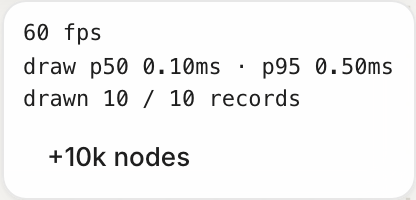
Zooming out draws simplified shapes. Splitting a huge board into pages (Pro) or into several boards also helps.
Kelvo won't work offline
Open the app itself (not just the home page) once while online. After that your browser has everything it needs offline.